Run your first Addon
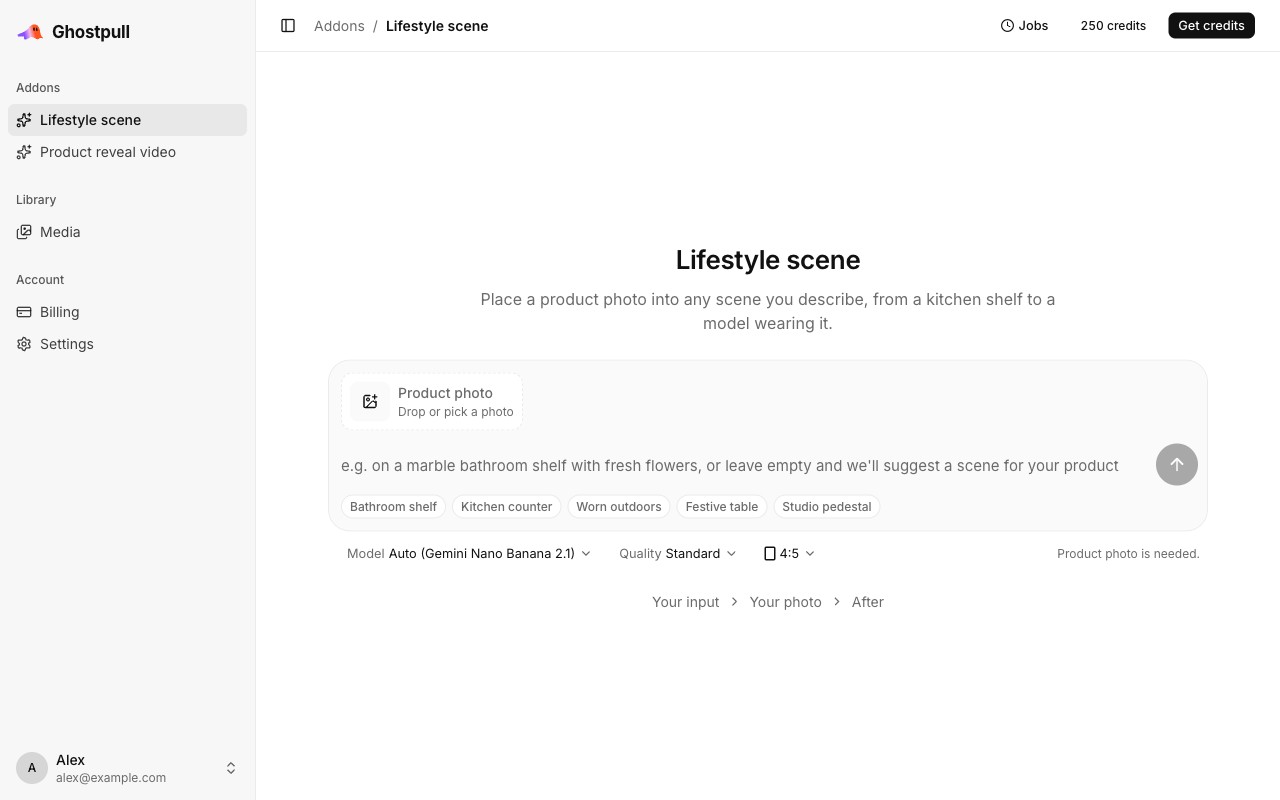
Use Lifestyle scene to place a product photo in a scene you describe.
Before you start
Log in and have a PNG, JPEG, WebP or GIF photo ready, at most 50 MiB.
Steps
-
On the home page or in the sidebar, select Lifestyle scene.
-
Select Product photo, then Upload from computer, and choose your photo. Its attachment appears in the composer. To reuse an uploaded photo, choose Choose from media library instead.
-
Describe a scene, such as
on a wooden kitchen counter in soft morning light, or select one of the suggestions. Leaving it empty lets the Addon suggest a scene. -
Check the options and displayed credit price, then select Generate (the arrow button). The page shows the run's progress.
-
When it finishes, open or download the result. Successful output files also appear under Library.
Keep the run page's URL to return to this result. While the run is working, Jobs in the top bar also links to it. Closing the tab does not cancel it.
Next
- Run an Addon: reuse photos and follow several runs.
- Media library: find your uploads and results.
- Credits: what the displayed price means during preview.